 Photoch
Open the editor
Replace background
Change the background of a photo with AI
Keep the person or product and put them somewhere new: a clean studio, a beach, a forest, a city street, or any place you describe. Photoch paints the new scene and lights your subject to match, so it looks photographed there instead of pasted on.

How to change a photo's background
- Open a photo in Photoch: drag it onto the page or choose File > Open.
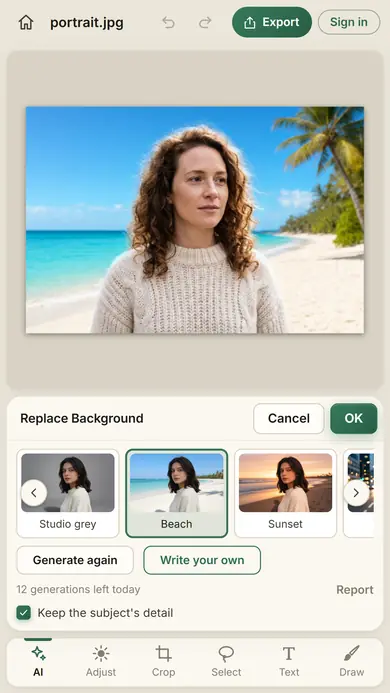
- Open Replace Background. Click Replace background in the floating bar under the canvas, or choose Edit > Replace Background. On a phone, tap AI, then Replace background.
- Pick a background, or click Write your own and describe the place, like "a rainy street in Tokyo at night".
- Click Generate. Photoch finds the subject for you; if you made a selection first, that's the subject. Click Generate again for another version, and use the arrows to compare them.
- Click OK. The new picture is a layer above your photo, so the original stays underneath.
Eight ready-made backgrounds
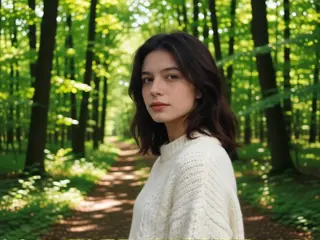
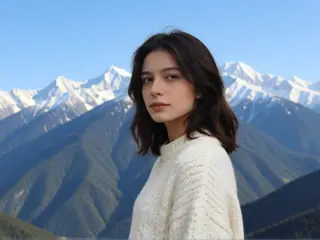
Every example below was made by Photoch from the same photo.






Lit like it was taken there
A cut-out pasted onto a new background rarely looks real, because the light doesn't match. Replace Background paints the whole scene again, so the light and color of the new place fall on your subject too.
With Keep the subject's detail on, which is the default, the person or product stays exactly as photographed, face, hair and clothes included, and only takes on the new scene's light and color.
Replace or remove?
Need a transparent background instead, for a product listing or a design? Use Remove background: one click hides the background with a layer mask, and you can export a transparent PNG.
Tips for better results
- Describe the place, not the edit: "a snowy mountain cabin", not "change the background to a cabin".
- If the photo has more than one possible subject, select the one you want first.
- Generate again if the result isn't quite right. Every result is different.
- Want a different mood afterwards? Try Change Lighting on the result.
Questions
Is Replace Background free?
Yes. You get free generations every day without an account, and twice as many when you sign in. Each Generate counts as one, and the allowance starts again at midnight UTC.
Will it change my face?
Not with Keep the subject's detail on, which is the default: the subject stays exactly as photographed and only takes on the light and color of the new scene. If Photoch can't find a subject, the whole picture is the AI's version.
Can I choose what stays in the photo?
Yes. Select it first, for example with Select > Subject, the Lasso or Select by Prompt, then open Replace Background. Your selection is kept as the subject.
Can I get a transparent background instead?
Yes. Use Remove background: one click hides the background with a layer mask, and you can export the result as a transparent PNG.
What happens to my photo?
A copy of the layer, made smaller, is sent to Photoch's AI server, processed in memory and deleted as soon as the result is back. It isn't stored or used for training. See the privacy policy.
More AI tools
Change lighting
Relight a photo as a sunset, a studio portrait, a neon night and more. Change the lighting
AI photo styles
Become a samurai, a superhero or your older self, or redraw a photo as anime or an oil painting. Try a style
Restore old photos
Clean up scratches and fading, and colorize black-and-white photos. Restore a photo
AI image upscaler
Enlarge a photo 2× or 4× with sharp detail instead of blur. Upscale an image
Give your photo a new background
Free, in your browser, with nothing to install.